
Helpful next steps: How to Copy the Correct Pinterest Pin Link for DownloadingHow to Download Pinterest Content on Your Phone: Android and iPhone
You find a useful video on Pinterest: a recipe, a DIY tutorial, a workout, a design idea, or a travel tip. You save it to a board, but later you want the actual file on your phone or computer. Maybe you need it offline. Maybe you want to keep it in a project folder. Maybe the pin is hard to find again.
Pinterest is built mainly for saving ideas inside the platform. It may offer direct download options for some content, such as certain image Pins, but many videos, GIFs, and pin types do not have a simple download button. A Pinterest downloader helps when you need an available media file from a public pin link.
What Is a Pinterest Downloader?
A Pinterest downloader is a tool that lets you save available media from a Pinterest pin link. You copy the URL of a public pin, paste it into the downloader, and the tool checks what media can be downloaded.
Depending on the pin, a downloader may help you save:
- Pinterest videos
- Images
- GIFs
- Media from some supported pin types
The goal is not complicated: when the media is available, it gives you a local file instead of only a saved pin inside Pinterest.
For example, PintSave lets you download available Pinterest videos, images, and GIFs directly in your browser. You do not need to install an app or log in with your Pinterest account.
How Does a Pinterest Downloader Work?
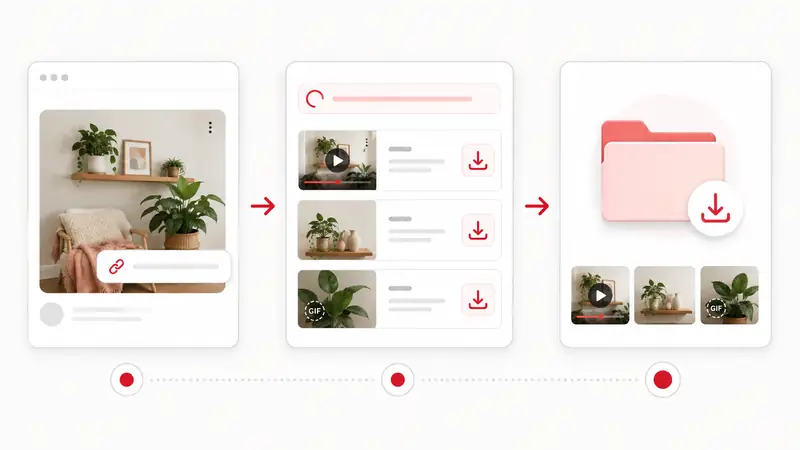
Most Pinterest downloaders follow the same basic process.
1. Copy the Pinterest Pin Link
Open the pin you want to save and copy its link. This should be the direct link to the pin, not just a board, profile, or search results page.
A correct link usually leads to one specific Pinterest post.
2. Paste the Link Into the Downloader
Open the downloader, paste the copied link into the input field, and start the search. The tool checks the pin and tries to find the available media file.
With PintSave, this step happens in the browser, so you can use it on a phone, tablet, or computer.
3. Download the Available File
If the media is available, you can download it to your device. On desktop, it usually goes to the Downloads folder. On mobile, it may appear in Downloads, Files, or your gallery, depending on the browser and operating system.
When Do You Actually Need One?
You do not need a downloader for every Pinterest post. If you only want to collect inspiration, Pinterest boards are usually enough. A downloader is useful when you need the actual file.
You Want Offline Access
Offline access is one of the most practical reasons to use a downloader. It helps when you want to keep:
- Recipe videos
- DIY instructions
- Fitness routines
- Study materials
- Travel ideas
- Design references
Once the file is saved, you can open it without loading Pinterest again.
You Need to Save a Pinterest Video
Pinterest often lets you save a video to a board, but that is not the same as downloading the video file. If you need the file on your device, a Pinterest video downloader is more practical than recording your screen.
Screen recording can lower quality, include interface elements, or capture unwanted notifications. Downloading the media directly is usually cleaner.
You Are Organizing Project References
Many people use Pinterest for work and planning: designers, students, marketers, decorators, content creators, and event planners.
A downloader can help you build a local folder for a project, for example:
- Interior ideas
- Logo references
- Outfit inspiration
- Social media concepts
- Wedding planning
- Product photography examples
This makes it easier to sort, rename, compare, and back up files.
You Want to Avoid Losing Useful Content
Pins can change or disappear. A post may be deleted, made private, or become unavailable. If a pin contains something important, saving a copy can help you keep access to it.
This is especially useful for practical content such as tutorials, instructions, recipes, and visual references.
How to Use a Pinterest Downloader Safely
A good downloader should be simple. It should not ask for more access than it needs.
Before using any Pinterest downloader, check a few things:
- It should not ask for your Pinterest password
- It should work without logging in
- It should not require unknown browser extensions
- It should use HTTPS
- It should only need the pin link
- It should not force unrelated file downloads
If a website asks you to install extra software or enter your account details, it is better to avoid it.
What a Pinterest Downloader Cannot Always Do
Some pins cannot be downloaded. This may happen when the content is private, deleted, restricted, affected by creator settings, or not available as a direct media file. Sometimes a post looks like a video but only contains an image preview or a pin type that is not supported.
Also, downloading content does not mean you own it. Saving something for personal reference is different from reposting it, using it in ads, or adding it to your own commercial project. If you plan to reuse content publicly, check the original source and get permission from the copyright holder when necessary.
Final Tips
Use a Pinterest downloader when you need the actual file, not just a saved pin, and the media is public and available. It is most useful for offline access, video downloads, project research, backups, and organizing references outside Pinterest.
A few practical habits help:
- Copy the direct pin link
- Use a browser-based tool if you do not want to install anything
- Keep downloaded files organized by topic or project
- Avoid tools that ask for your Pinterest login
- Respect the creator's rights before reusing content
If you only want to collect ideas, a Pinterest board may be enough. If you need a video, image, or GIF saved on your device, a tool like PintSave is the more practical option.