Free online TikTok video downloader for supported public posts. Paste a direct video or short share link to check the post and save the available MP4 file. No PintSave account, app, or browser extension is required.
Free to use
Secure connection
No registration required
Reading the post
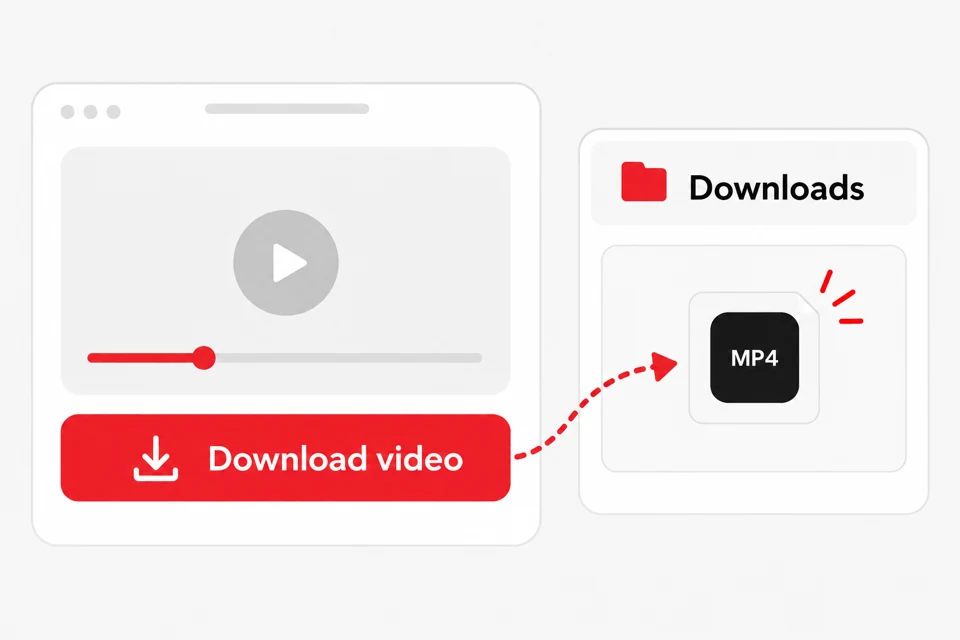
Find the file in your Downloads folder.
Which TikTok links are supported?
Direct public video links
Use the URL of one public TikTok video. The address normally contains the creator name followed by /video/ and a numeric post ID.
Exampletiktok.com/@username/video/123456789
Short share links
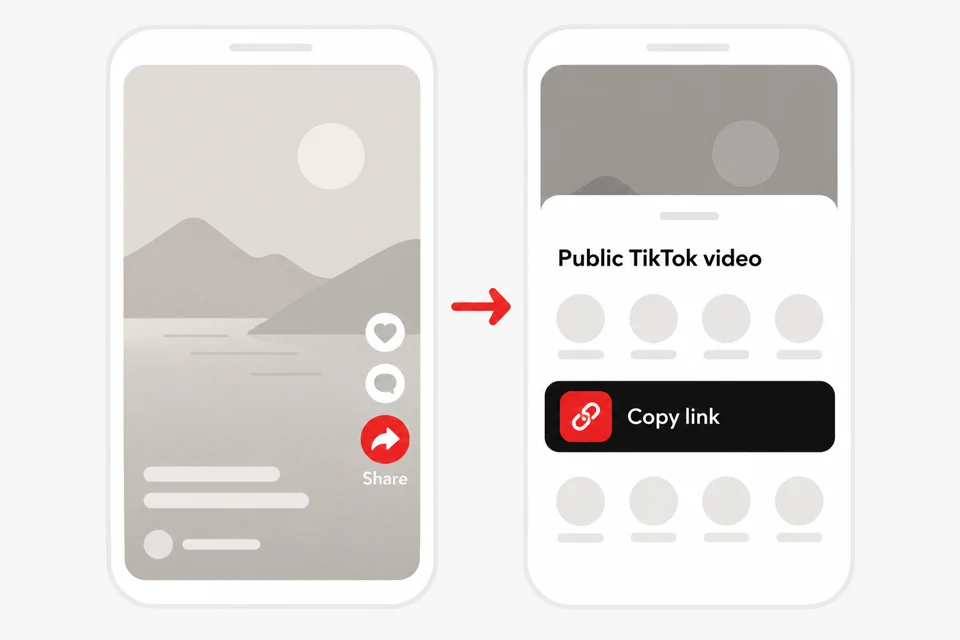
Links copied from the TikTok share menu are accepted when they redirect to an available public video.
A profile, search page, playlist, private post, or image-only post does not identify an available video file for this tool.
ExampleProfiles, search pages, playlists, and private posts
How to download a TikTok video
01
Open the public video
Open the individual video in TikTok. Select Share, then Copy link. Do not copy a profile or search-page address.
Copy the direct video link.
02
Paste the link and check the preview
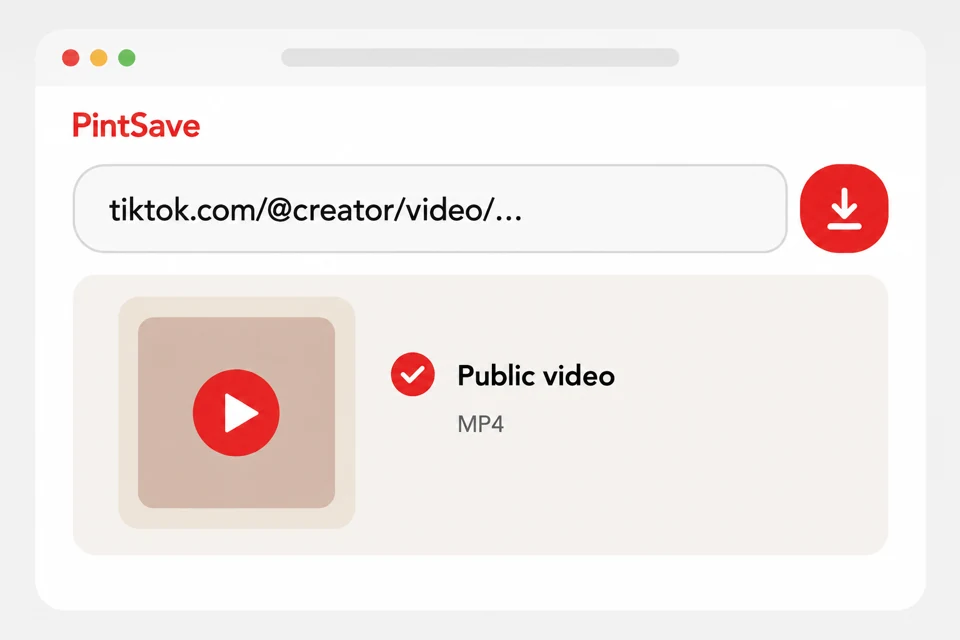
Paste the link into PintSave and select Check video. Confirm that the thumbnail, creator, and description match the post you intended to save.
Check the post before downloading.
03
Save the MP4 file
Select Download video and wait until the button says Your download is ready. Find the MP4 in your browser downloads or the Downloads folder on your device.
Open the saved MP4 from Downloads.
Available format, quality, and watermark
PintSave saves the video file supplied for the public post as MP4. Resolution depends on the source; the downloader does not upscale the video or invent an HD or 4K version.
When TikTok exposes more than one candidate, the service prefers an available stream without the TikTok watermark. A watermark-free file is not guaranteed, and captions, logos, or text embedded in the original video remain unchanged.
Why a TikTok video may not be available
The link is not a video link
Open the individual post and copy its link again. Profile, playlist, search, and image-post URLs are rejected because they do not point to one supported video.
The post is restricted
Private, deleted, age-restricted, or region-limited posts may open for a signed-in user but remain unavailable to the downloader.
TikTok did not return an MP4
TikTok responses can change or fail temporarily. If the public post still opens, wait briefly, copy a fresh link, and try again.
Tested capabilities
Last tested:
Link or content type
Result
What was checked
Public video post
Supported
A public example resolved to an H.264/AAC MP4 at 540 × 960, with thumbnail, creator, and duration metadata.
Short share link
Supported
vm.tiktok.com, vt.tiktok.com, and tiktok.com/t links are followed only when they resolve to a supported public video.
Private or restricted post
Not supported
PintSave does not sign in to TikTok or bypass post, account, age, or regional access controls.
Profile, search, playlist, or image post
Not supported
This tool accepts one public video post at a time and does not download collections or image-only posts.
How the TikTok downloader is maintained
Maintainer
The PintSave service team maintains this downloader and website.
How it is checked
Representative links to public videos, including short share links, are processed through the working service. The preview and returned MP4 are then validated.
Corrections
Incorrect page information and reproducible download problems can be reported through Reviews or Contact.
Service checks
Downloader errors and changes in TikTok page or media responses are reviewed using reproducible public posts.
Public does not mean free to reuse
Download only videos you created or have permission to save. A public post can still be protected by copyright, privacy, publicity, and platform rules. Prepared files are stored temporarily and PintSave is not affiliated with TikTok.
TikTok downloader FAQ
PintSave is free to use for supported public TikTok video links. No PintSave account or TikTok login is required.
Use a direct public video URL or a short share link from vm.tiktok.com, vt.tiktok.com, or tiktok.com/t. Profiles, search pages, playlists, private posts, and image-only posts are not supported.
PintSave prefers an available watermark-free stream, but TikTok does not provide one for every post. Text, captions, and logos embedded in the source video are not removed.
Yes. Use a modern mobile browser without installing an app. After the download starts, find the file in your browser downloads or the Files app used by your device.
The result reflects the compatible MP4 file TikTok made available for that post. PintSave does not create extra resolutions or upscale the source.
No. PintSave does not sign in to TikTok or bypass privacy, age, regional, or account restrictions.
Some browsers open MP4 files in a media player. Use the player download control or your browser’s save or share menu to keep the file on your device.



Reading the post